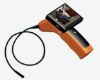
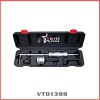
details of inspection camera
Features:
3.5" LCD screen display
powered by 4 AAA dry battery for portable mobility
Built in LED light for night vision (brightness can be adjusted)
TF card support up to 32GB
With MP3 player function
specification for wireless snake camera
-4 Channesl Wireless Receiving Function
-MP3 Player
-Take photos and record videos
-Can play back pictures, recorded video
-Can be used as U disk
-Support 32GB TF Card
-3.45 inch colour LCD display
-Picture resolution:JPEG 640*480
-Video resolution: AVI 640*480
-Image format:JPEG
-Video format:MJPEG
-Built-in Lithium Battery
-4 pieces AAA battery
-300k High definition CMOS sensor
-4 white LED lights
-The clearness of the LED Fill Light can be adjusted
Operation Illustration
-Please install the 4pcs AAA battery in correct direction,and open power button in the handle
-After switch on DVR Receiver,press Left key to switch DVR Channel to the same Channel with Camera and receive correct and clear image.
-You can adjust LED Fill light by pressing the button in the handle to increase the LED brightness when it is in dim light condition
-Please Stretch the flexible hose to the places which you need to observe under recording menu
-Please switch off the power after finishing using it to reduce the loss of the battery electricity.Meanwhile,please take out the battery when you do not use it for a long time.
-Recommend you use high performance battery
Problems and solutions
1:No picture and voice when playback on this machine
Answer: Please check whether the display is in the TV output state,after setting the TV output state,it will switch to TV display mode when playback again
2:Images can not be stored
Answer: This problem may be the bad TF card or there are bad files in internal Flash and TF card when loop recording or take pictures.Or you switch off the power directly when recording or taking pictures so that the machine has saved some bad files.Please copy the important information of the card to computer or other devices and format the storage, then try it again and it will work normally. You’d better format the TF card for the first time use,thus it will be better to use.
3:The image is very white and not clear
Answer:Check the light are clear enough and LED Fill light are on or not.Please turn off the LED lights or turn down it,while you may also move the camera degree between the objects and the camera.Normally, the effect is better to observe it tiltly in dim environment.
4:Images are not clear
Answer: Check camera lens is dirty, polluted, please wipe clean. Note Do not use a strong solution of caustic to clean.